Location
Kaunas, Lithuania

The Visteon R013 radio becomes locked when removed from its original vehicle, preventing reuse in another car or testing on a bench. This security feature blocks retrofits and standalone operation. This installation guide covers the R013 1DIN, R013 2DIN, R013 X07, R013 X87/X98, R013-PH2 and R013-CMFB units.
On startup, the radio checks for a vehicle ID message on the CAN bus. While waiting for this expected unlocking message, the screen displays:
“Authentication in progress…”

If the expected message is not received — or if the ID doesn’t match the one stored internally — the radio enters a locked state and displays a warning message:
“Radio Locked. Please Contact Dealer”.

To bypass this restriction, a CAN filter for the Visteon R013 (also known as a security code emulator or immobilizer bypass) can be installed. This device automatically learns the radio’s security ID and simulates the required unlock message on the CAN line, allowing the radio to boot normally.
To unlock the Visteon R013 radio, the CAN filter (immobilizer emulator) can be installed in two ways, depending on your use case:
Best for bench testing or quick retrofits. The filter is connected externally to the wiring harness, without opening the radio unit.
✅ Easy to install, fully reversible, and ideal for diagnostics or testing.
More advanced option. The filter is mounted inside the radio, directly to the PCB.
✅ Offers a clean, OEM-style integration with no visible modifications.
⚠️ Requires soldering skills and technical knowledge.
⚠️Important: The CAN filter must be configured for Visteon R013 units by soldering jumper J3 on the PCB.

External installation is the easiest method and requires only a few basic connections:
🔧 Note:
The CAN1 connection can remain disconnected for first-generation R013 units, even in a vehicle. However, it’s recommended to connect it to enable passthrough of the vehicle’s CAN traffic.
The CAN1 connection is mandatory for second-generation (Phase 2 / PH2) units, as these radios are woken up via the CAN bus
By connecting CAN1 to the vehicle’s CAN bus, the filter passes CAN traffic through to the radio, allowing diagnostic communication and steering wheel controls (if equipped) to continue functioning. This setup ensures full communication with the radio while bypassing the immobilizer lock.
🖼️ Refer to the wiring diagrams below for correct connection points.


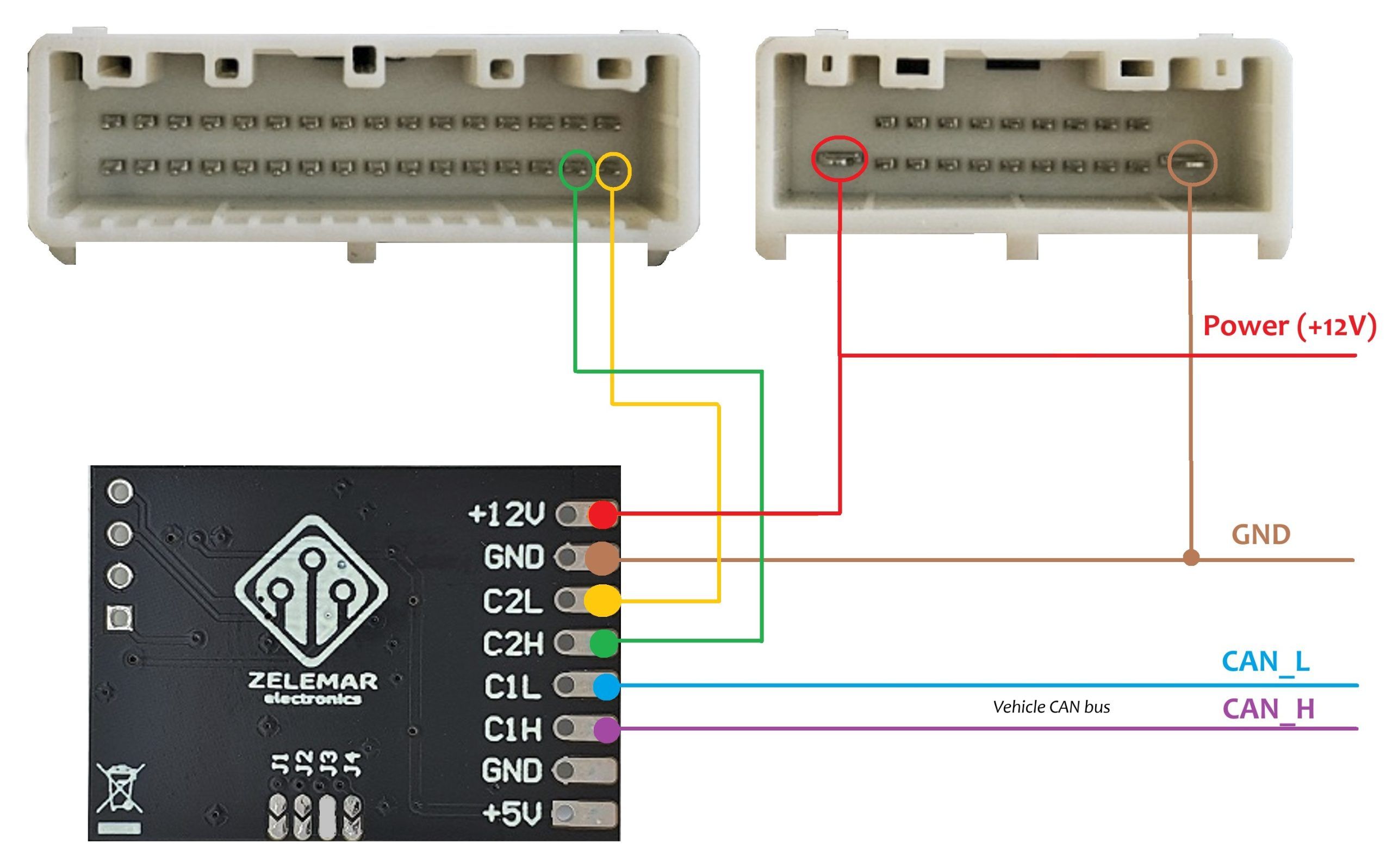
Carefully open the Visteon R013 enclosure to access the internal PCB. Remove the necessary screws and gently separate the housing without damaging the ribbon cables.
Position the CAN filter module securely inside the housing. Use non-conductive adhesive (e.g., hot glue or double-sided tape) to prevent the board from shifting or contacting nearby components.
Refer to the provided diagrams below to locate power and CAN lines on the radio’s mainboard. These are where the CAN filter will connect.
You must remove the existing CAN choke on a CAN line to properly insert the CAN filter in-line.

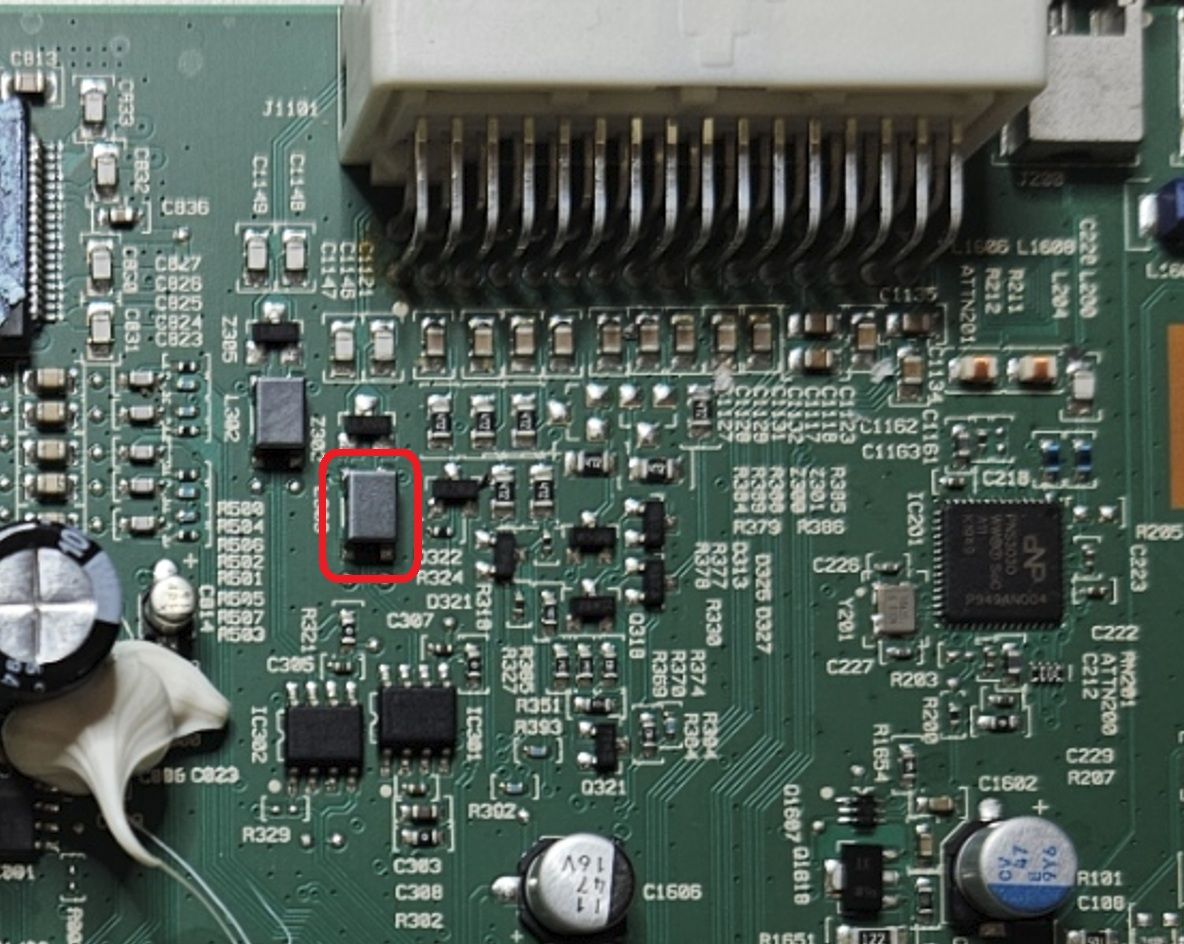
Connect the CAN filter’s wires to the appropriate pads:
🔧 Note: The CAN1 connection can remain disconnected for 1st gen units. However, it’s recommended to connect it to enable passthrough of the vehicle’s CAN traffic. The CAN1 connection is mandatory for 2nd gen units!

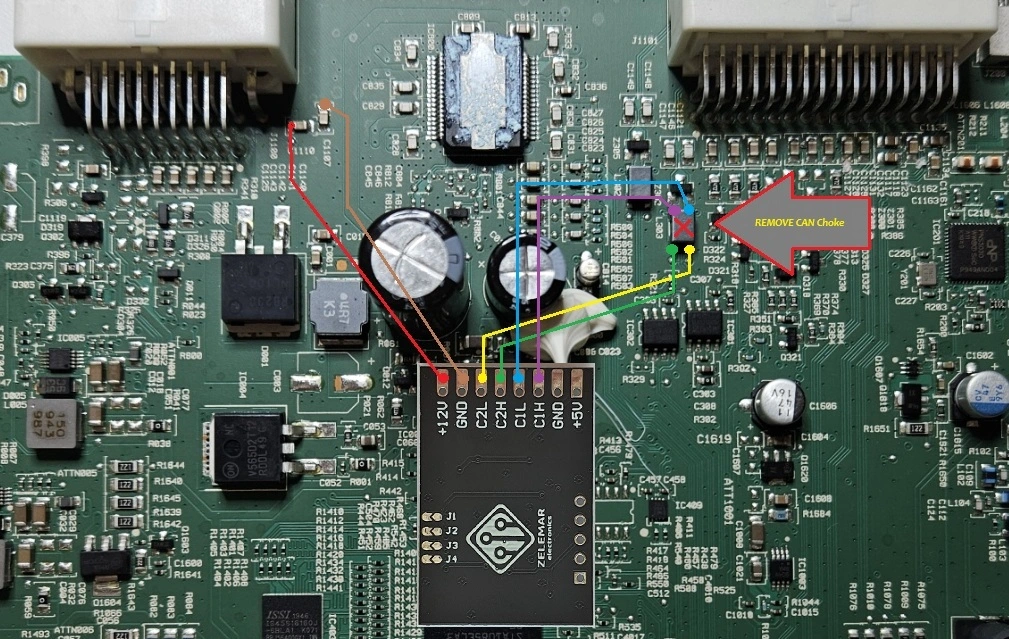
After verifying all connections, reassemble the unit and apply power. The radio should now bypass the factory immobilizer lock and boot normally.
Watch the status LED on the CAN filter — it tells you what’s happening:
Learning takes a few seconds after power-up. What you see next depends on which R013 variant you have.
These are powered together with the radio through the ignition wire.
On the bench, apply both ignition and power — the radio should boot the same way.
These are permanently powered and have no separate ignition wire.
Because a Ph2 radio is meant to sleep, it won’t stay powered on a bench with no vehicle. To keep it awake and unlocked continuously for testing, solder jumper J4 in addition to J3. The filter will then keep the unit awake and unlocked so you can verify it fully.
⚠️ Important: Remove jumper J4 before installing the radio in the vehicle. J4 is intended for continuous bench operation and should not remain installed during normal vehicle use.




I installed the filter today according to the instructions, but it isn’t working; the display shows: PSS:0x0
VIP:7.7.1
PN:281156611R
EQ:0000 AP6.2.9
Hello, what does the radio display show before the installation?
Radio locked please contact dealer
Visteon R013 Ph2 and R013-CMFB already supported for unlock and bench testing
part of you R013-X07
I also have a PH2-part code 280210807R.
Still no expectations?
I already have a solution on R013 Ph2 unlock and bench testing. It will be available soon.
Visteon R013-X07 from Dacia Sandero is supported and tested on PN: 281156181R
Is the (part name) R013PH2-1DIN supported by this emulator ??
No, R013 Phase2 not supported yet
hello does it support R013- 2DIN thanks
I didn’t tested it yet on R013-2DIN myself, but it should work.
thank you
Hello,
I am interested in your CAN filter for the Visteon R013 radio. My unit is a R013PH2-1DIN (Part Code: 281152370R).
I see on your website that R013 Phase 2 units are currently not supported. Could you please clarify if you have any plans to release a version or firmware update that supports this specific model in the near future?
Hello, I have plans on R013 Ph2 unit unlocking, but cant tell when i will work on it.
I also have a PH2-part code 280210807R
I’m interested, but am not an electronic expert.